您现在的位置是:网站首页> 编程资料编程资料
添加powershell脚本来解决nuget打包文件丢失问题_PowerShell_
 2023-05-26
581人已围观
2023-05-26
581人已围观
简介 添加powershell脚本来解决nuget打包文件丢失问题_PowerShell_
对于进行nuget打包时,有时我们需要添加一个配置文件,就是一些文本文件,而这些文件我们在网站发布时需要同时复制到输出目录,否则会出现文件丢失的问题,我们在打包时通过添加powershell脚本来解决它。
一般添加powershell包之后,包的格式如下
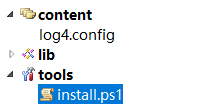
添加-〉工具-〉install.ps1脚本
param($installPath, $toolsPath, $package, $project) $configItem = $project.ProjectItems.Item("log4.config") # set 'Copy To Output Directory' to 'Copy if newer' $copyToOutput = $configItem.Properties.Item("CopyToOutputDirectory") $copyToOutput.Value = 1 # set 'Build Action' to 'Content' $buildAction = $configItem.Properties.Item("BuildAction") $buildAction.Value = 2 当我们在项目里添加nuget包时,查看输出窗口,可以看到我们的ps1脚本被自动执行了,它修改了log4.config的文件属性,它让具有“始终复制”到输出目录的属性!

现在我们在建立nuget包时,如果希望进行一些初始化的功能,就可以使用这种方式了!
相关内容
- 使用 powershell 创建虚拟机_PowerShell_
- 如何防范PowerShell代码注入漏洞绕过受限语言模式_PowerShell_
- 通过DNS TXT记录执行powershell_PowerShell_
- PowerShell 语音计算器实现代码_PowerShell_
- PowerShell脚本 随机密码生成器(ps随机密码生成器)_PowerShell_
- 原创powershell脚本小工具ctracert.ps1跟踪路由(win8以上系统)_PowerShell_
- powershell玩转SQL SERVER所有版本的方法_PowerShell_
- powershell玩转sqlite数据库详细介绍_PowerShell_
- PowerShell 未经数字签名 系统将不执行该脚本_PowerShell_
- Powershell 脚本数字签名实现方法_PowerShell_